

When it comes to top Wi-Fi smart home devices, you’ll want to ponder three standout options. The Lockly Secure Pro Smart Lock offers advanced biometric security and multiple access methods, while Kasa’s HS103P2 Smart Plugs provide reliable energy monitoring and scheduling in a compact design. Sophie’s Fingerprint Smart Door Lock delivers five versatile entry methods with built-in Wi-Fi connectivity. Understanding the installation requirements and network security factors will help you make the most informed choice for your connected home.
Key Takeaways
- Lockly Secure Pro Smart Lock offers comprehensive security with AI-powered features and multiple access methods, though requires additional Wi-Fi hub.
- Kasa Smart Plug HS103P2 provides reliable, hub-free smart outlet control with scheduling features and compatibility with major voice assistants.
- Sophie’s Fingerprint Smart Lock includes built-in Wi-Fi and five entry methods without requiring additional hub purchases.
- Smart plugs represent an easy entry point into home automation, with simple installation and immediate functionality.
- Consider device compatibility with existing home networks and voice assistants before purchasing any Wi-Fi-enabled smart home products.
Lockly Secure Pro Smart Lock with Wi-Fi & Biometric Fingerprint Sensor

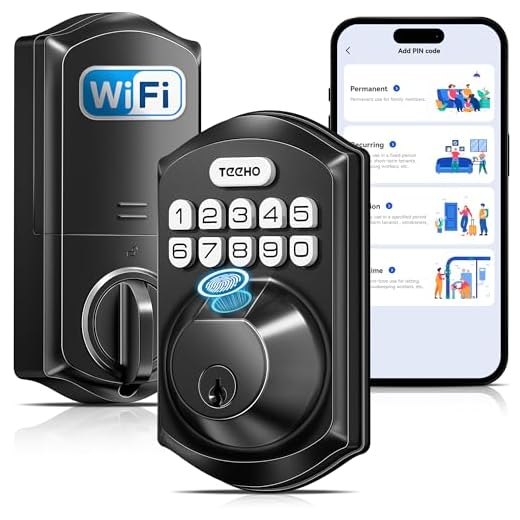
The Lockly Secure Pro stands out as a versatile smart lock for homeowners who want multiple ways to secure their doors. You’ll access your home through a PIN Genie keypad, 3D fingerprint sensor, mobile app, voice commands, or traditional keys. The lock’s AI-powered security reshuffles keypad numbers after each use and stores up to 99 fingerprints.
With the Lockly Home app and optional Wi-Fi hub, you can control your lock from anywhere, receive real-time alerts, and grant temporary access to visitors. Installation’s straightforward with step-by-step guides, and you’ll never get locked out thanks to backup physical keys and a 9V emergency port.
Best For: Homeowners and business owners seeking a highly secure, feature-rich smart lock with multiple access methods and remote management capabilities.
Pros:
- Multiple secure access methods including biometric fingerprint sensor, PIN pad, and mobile app
- AI-powered security features like number reshuffling and advanced fingerprint recognition
- Comprehensive remote management with real-time alerts and temporary access options
Cons:
- Requires additional Wi-Fi hub purchase for full remote functionality
- Higher price point compared to simpler smart locks
- May be overly complex for users seeking basic lock functionality
Kasa Smart Plug HS103P2, Wi-Fi Outlet (2-Pack)

Smart home enthusiasts seeking reliable Wi-Fi outlets will find the Kasa Smart Plug HS103P2 two-pack an excellent addition to their connected setup. You can control these UL-certified, 15-amp plugs through Alexa, Google Assistant, or the Kasa app without needing a hub.
Setup is straightforward on your 2.4GHz network, and you’ll get access to powerful features like scheduling, timers, and energy monitoring. The compact design lets you stack two plugs in a single outlet, making them perfect for controlling lights, fans, or heaters. While some users raise concerns about TP-Link’s Chinese origins, these plugs have proven reliable over years of use and integrate seamlessly with Matter and Apple Home.
Best For: Smart home beginners and tech-savvy users looking for reliable, hub-free Wi-Fi outlets to automate lights and appliances with voice control and scheduling capabilities.
Pros:
- Easy setup process with no hub required and broad compatibility with Alexa, Google Assistant, and Apple Home
- Compact design allows stacking multiple plugs while offering comprehensive features like scheduling, energy monitoring, and geofencing
- Proven reliability with years of consistent performance and UL certification for safety
Cons:
- Limited to 2.4GHz Wi-Fi networks only
- Requires firmware update during initial setup
- Potential security concerns due to manufacturer’s Chinese origin
Sophie’s Fingerprint Smart Door Lock with WiFi & Keyless Entry

Homeowners seeking versatile entry options will appreciate Sophie’s Wi-Fi-enabled door lock, which offers five different ways to access your door. You can use fingerprints, the Tuya app, passcodes, IC Fobs, or a mechanical key. The lock stores up to 300 unique credentials.
The built-in Wi-Fi connects directly to your app without requiring a separate bridge. You’ll gain entry to your door in less than 0.3 seconds using fingerprint recognition, and the auto-lock feature activates when you leave. Installation is straightforward with just a Phillips screwdriver, and the lock works on both left and right-handed doors. Track activity and manage access through the app while enjoying a 2-year warranty.
Best For: Smart home enthusiasts and busy households who want multiple secure entry options with remote management capabilities.
Pros:
- Five versatile entry methods provide flexibility and backup options
- Built-in WiFi enables remote access without additional hub purchase
- Quick and easy DIY installation works for any door orientation
Cons:
- Requires stable WiFi connection for remote features to work
- Limited to 300 total users across all credential types
- Reliance on app and electronic features may concern traditional security-minded users
Factors to Consider When Choosing Wi-Fi Smart Home Devices

When selecting Wi-Fi smart home devices, you’ll need to evaluate each device’s installation complexity, network security features, and compatibility with your existing smart home ecosystem. You should check if the device offers power backup options to maintain functionality during outages and verify that its remote access features align with your lifestyle needs. Consider how these devices will integrate with your current Wi-Fi network’s capabilities and range to guarantee reliable performance throughout your home.
Installation Requirements and Complexity
Before diving into your smart home journey, understanding the installation requirements of Wi-Fi-enabled devices can save you time, money, and frustration. You’ll need to evaluate whether you’re comfortable with DIY installation or if you’ll need professional help, especially for devices requiring complex wiring or wall modifications.
Check if your existing smart home infrastructure supports new devices you’re considering. You’ll want to confirm hub compatibility and assess practical factors like door frame measurements and power outlet locations. Some devices offer plug-and-play simplicity, while others demand more technical expertise.
Don’t forget to review available installation resources. Many manufacturers provide detailed guides and customer support, and you can always opt for professional installation services if you’re unsure about tackling the setup yourself.
Network Security Protocols
While setting up your smart devices is important, protecting them is equally vital. You’ll want to confirm your devices support current security protocols like WPA2 or WPA3, as older standards such as WEP leave your network vulnerable to attacks.
Don’t settle for basic password protection alone. Enable two-factor authentication whenever it’s available, and create strong, unique passwords for each device. You should also keep your devices’ firmware and software up to date to patch any security vulnerabilities that manufacturers discover.
For an extra layer of protection, consider setting up a separate network or guest network specifically for your smart home devices. This strategy prevents potential hackers from accessing your main network and sensitive data if they manage to compromise one of your smart devices.
Device Compatibility Range
Setting up smart home devices requires careful consideration of their compatibility range and network requirements. You’ll need to verify if your device supports both 2.4GHz and 5GHz Wi-Fi bands, as this dual-band capability offers better flexibility and performance options.
Check the device’s wireless range to guarantee it’ll maintain a reliable connection from its intended location to your router. Your smart home device should seamlessly integrate with your existing ecosystem, including voice assistants and mobile apps. Don’t forget to test the device’s ability to maintain a stable Wi-Fi connection, as drops in connectivity can disrupt your smart home operations.
Before purchasing, confirm that the device matches your home’s wireless network standards. This compatibility check will help you avoid connection issues and certify smooth operation throughout your smart home setup.
Power Backup Options
Beyond network compatibility, power reliability stands at the forefront of smart home device selection. When choosing your devices, look for options with built-in rechargeable batteries or compatibility with UPS units to guarantee continuous operation during power outages.
You’ll want to prioritize backup power for essential components like security systems and smart hubs. Consider devices that feature emergency power ports supporting 9V batteries, as they’ll provide temporary functionality when your main power source fails. External battery packs can also serve as reliable alternatives for keeping your devices running.
For the most dependable setup, select devices that automatically switch to backup power sources and offer extended battery life. This way, you’ll maintain remote access and control of your smart home system even during unexpected blackouts.
Remote Access Features
Remote access capabilities serve as a cornerstone feature when selecting Wi-Fi smart home devices. You’ll want to guarantee your chosen devices offer robust mobile app compatibility and seamless cloud platform integration for convenient control from anywhere.

When evaluating remote access features, check that the device supports secure data transmission protocols to protect your home’s privacy. Look for smart devices that integrate voice control and geofencing, which can automatically adjust settings based on your location. You’ll also need to ponder how easy the device is to set up and manage through its remote interface.
Don’t forget to confirm the reliability of remote connectivity, especially for critical functions like door locks, security cameras, and real-time alerts. The ability to schedule device operations and receive instant notifications about home activities should be standard features.
Energy Usage Impact
While smart home devices promise convenience and automation, their impact on energy consumption requires careful consideration. You’ll find that some Wi-Fi-enabled devices can consume up to 10 times more power than their traditional counterparts, especially in standby mode.

To manage your home’s energy efficiency, pay attention to each device’s networking technology and processing capabilities when making purchases. You can minimize power consumption by selecting energy-efficient models and optimizing their usage patterns. Keep track of your devices’ energy consumption through regular monitoring, which helps you identify any unexpected power drains.
Don’t overlook the cumulative effect of idle power usage from multiple smart devices. By making informed choices and actively managing your smart home ecosystem, you’ll enjoy the benefits of home automation while maintaining reasonable energy costs.
Frequently Asked Questions
Can Wi-Fi Smart Devices Work During Internet Outages?
Most Wi-Fi smart devices won’t work during internet outages since they rely on cloud connectivity for remote control and automation. However, you can still use some devices through your local network if they have offline functionality. You’ll need to check each device’s specifications, as some smart lights, switches, and thermostats can maintain basic operations through their hub even when your internet’s down.
What Happens to Smart Home Devices if I Change My Wi-Fi Password?
If you change your Wi-Fi password, your smart home devices will disconnect from the network and won’t work until you reconnect them. You’ll need to update each device with the new password through their respective apps or setup processes. It’s a bit time-consuming since you’ll have to do this one device at a time, but it’s necessary to maintain your smart home’s functionality and security.
Do Smart Home Devices Increase My Monthly Electricity Bill Significantly?
Most smart home devices consume only 1-3 watts per hour, which is less than a typical LED bulb. You won’t notice a significant increase in your electricity bill from smart devices alone. While they’re always “on” to maintain connectivity, they’ll add roughly $0.50-$1.50 per device annually to your power costs. However, smart thermostats and automated lighting can actually help you save money by optimizing your home’s energy usage.
How Many Smart Devices Can My Wi-Fi Router Handle Simultaneously?
Your router’s capacity to handle simultaneous devices depends on its model and specifications. Most modern routers can support 50-100 devices, but you’ll notice performance issues before reaching that limit. For ideal performance, you shouldn’t connect more than 20-25 devices simultaneously. If you’re planning a larger smart home setup, consider a mesh Wi-Fi system or a high-end router specifically designed for multiple connections.

Are Wi-Fi Smart Home Devices Compatible With All Internet Service Providers?
You’ll be thrilled to know that Wi-Fi smart devices work with literally every internet service provider (ISP) under the sun! They don’t care if you’re using Comcast, AT&T, Verizon, or a carrier pigeon service – as long as you’ve got a working internet connection and a Wi-Fi router, you’re good to go. Just make sure your smart devices support the Wi-Fi frequencies (2.4GHz or 5GHz) that your router broadcasts.
Related Articles You Might Like