- Key Takeaways
- Understanding Voice-Activated Smart Home Systems and Accessibility Benefits
- Essential Smart Devices for Users With Mobility Impairments
- Voice Control Solutions for Visual and Hearing Disabilities
- Setting Up Your First Accessible Home Automation System
- Customizing Voice Commands for Individual Needs and Preferences
- Integrating Smart Home Technology With Existing Assistive Devices
- Safety and Emergency Features in Accessible Home Automation
- Automated Emergency Alert Systems
- Fall Detection and Response
- Voice-Activated Emergency Protocols
- Cost Considerations and Funding Options for Accessibility Technology
- Available Funding Mechanisms
- Frequently Asked Questions
- Can Voice Control Systems Understand Speech Patterns Affected by Disabilities Like Cerebral Palsy?
- Will My Insurance Cover Smart Home Automation Devices Prescribed for Accessibility Needs?
- What Happens to Voice-Controlled Devices During Internet or Power Outages?
- Are Voice Assistants Hipaa-Compliant for Users With Medical Privacy Concerns?
- Can Multiple Caregivers Program Different Voice Profiles for One User’s System?
- Conclusion
- Related Reading



Voice-activated smart home systems let you control lighting, locks, thermostats, and door access through simple speech commands—transforming daily living for individuals with mobility limitations or visual impairments. Modern voice recognition exceeds 95% accuracy and enables customizable wake words, emergency protocols, and multi-device routines triggered by single phrases. You’ll need a compatible hub, wireless connectivity, and strategic device integration prioritizing critical functions like climate control and keyless entry. Understanding setup options, assistive technology compatibility, emergency alert configurations, and available funding sources will help you create a fully accessible environment tailored to your specific needs.
Key Takeaways
- Voice-activated systems enable hands-free control of lighting, locks, thermostats, and blinds through natural speech commands with over 95% accuracy.
- Smart home emergency protocols automatically call services, unlock doors, alert caregivers, and activate lighting when recognizing specific distress phrases.
- Compatible devices integrate with existing assistive technologies like screen readers and eye-gaze systems through IFTTT, MQTT, and Z-Wave protocols.
- Fall detection sensors trigger automatic emergency notifications, two-way communication, and sequential alerts to caregivers then emergency responders if needed.
- System costs range from $50 to $15,000 with funding available through Medicare waivers, VA programs, nonprofit grants, and insurance coverage.
Understanding Voice-Activated Smart Home Systems and Accessibility Benefits

Voice-activated smart home systems change how people with mobility limitations, visual impairments, or chronic conditions control their living environments. You’ll command lighting, thermostats, door locks, and entertainment systems through natural speech patterns, eliminating physical switches and remote controls.
Modern voice recognition accuracy exceeds 95% in ideal conditions, though you’ll need to account for speech impediments, accents, or respiratory conditions that affect voice clarity. Systems like Amazon Alexa, Google Assistant, and Apple HomeKit offer customizable wake words and sensitivity adjustments to match your specific vocal patterns.

User interface design matters greatly for accessibility implementation. You’ll want systems that provide audio feedback confirming commands, allow phrase customization for complex requests, and support multi-step routines triggered by single commands.
Integration capabilities determine your system’s expandability—choose platforms supporting Z-Wave, Zigbee, or Matter protocols to connect diverse devices. The Matter standard enables increased interoperability between devices from different manufacturers, allowing you to build a more comprehensive accessible smart home ecosystem. You’re investing in autonomy that adapts to your needs, not limitations.
Essential Smart Devices for Users With Mobility Impairments
Smart door locks with keypad or smartphone control eliminate the need to grip, turn, or fumble with traditional keys—particularly valuable when you’re using mobility aids or have limited hand dexterity. Smart doorbells extend this accessibility by letting you see and communicate with visitors without approaching the door, granting you complete control over entry management from any location.
Automated lighting systems respond to voice commands or motion sensors, eliminating switches positioned in hard-to-reach areas. You’ll configure these devices to match your specific mobility requirements and daily routines.
Modern security systems with smart alerts can distinguish between people and packages, providing customized notifications that help users with mobility impairments prioritize which visitors require immediate attention without unnecessary trips to check the door.
| Device Category | Primary Function | Accessibility Advantage |
|---|---|---|
| Smart Locks | Keyless entry control | Eliminates manual key manipulation |
| Smart Doorbells | Remote visitor monitoring | Controls access from stationary position |
| Automated Lighting | Voice/motion activation | Removes need for physical switches |
| Smart Thermostats | Temperature management | Adjusts climate without moving to wall unit |
| Motorized Blinds | Window covering control | Opens/closes coverings remotely |
Voice Control Solutions for Visual and Hearing Disabilities

Hands-free operation alters your home environment when visual or auditory limitations affect how you interact with devices. Voice control systems eliminate physical interface barriers, letting you command lighting, temperature, locks, and appliances through spoken instructions.
Voice recognition accuracy reaches 95% with modern platforms like Amazon Alexa, Google Assistant, and Apple Siri when you enhance microphone placement and train the system to your speech patterns. Position multiple echo points throughout your space to guarantee consistent command capture from any location.
For hearing disabilities, assistive technology integration connects voice systems with visual notification hubs. Smart displays show command confirmations, while programmable LED strips flash color-coded alerts for doorbell rings, smoke alarms, or timer completions.
Configure custom routines that trigger multiple actions simultaneously—saying “goodnight” locks doors, dims lights, and adjusts thermostats in one command.
IFTTT protocols extend compatibility across device ecosystems, refining your control options without platform restrictions.
Setting Up Your First Accessible Home Automation System
Your smart home setup requires three core components: a compatible hub (Amazon Echo, Google Home, or Apple HomeSmart), wireless connectivity throughout your space, and devices that integrate smoothly with your chosen ecosystem.
Prioritize critical functions first—lighting controls, door locks, and climate management deliver immediate independence gains.
Configure your user interface based on your interaction preferences. Voice users should enhance wake word recognition and create custom commands. Those requiring visual feedback need dashboard customization with high-contrast displays and large touch targets.
Test each automation sequence thoroughly before expanding your system.
Document your configurations and backup settings regularly. This maintenance discipline guarantees system reliability when you need it most.
Customizing Voice Commands for Individual Needs and Preferences

Voice control becomes truly powerful when you adapt it to match how you actually speak and think. Standard wake words and phrases often don’t account for speech variations, cognitive differences, or communication styles unique to individuals with disabilities.
Create personalized commands that work with your natural speech patterns. Replace “turn on the living room lights” with shorter alternatives like “lights on” or custom phrases that reflect your vocabulary. Most platforms let you assign multiple trigger phrases to single actions, giving you flexibility when speech clarity varies.
Adaptive technologies now offer sensitivity adjustments for pronunciation differences, response delays for processing time, and command confirmation options to prevent accidental activations. You can program macros that execute multiple actions with one phrase—essential when verbal communication requires significant effort.
Test your custom commands systematically. Document what works, refine what doesn’t, and build a command library that enhances your independence while minimizing cognitive and physical load.
Integrating Smart Home Technology With Existing Assistive Devices
While smart home devices deliver powerful automation capabilities, their true value emerges when they work seamlessly with the assistive technologies you already rely on. Smart device compatibility with wheelchairs, environmental control units, and augmentative communication systems amplifies your independence and control.
Modern assistive technology integration occurs through multiple protocols. MQTT bridges connect switch interfaces to smart hubs, while Z-Wave networks link environmental controls with automated lighting and HVAC systems.
You’ll find that screen readers now interface directly with voice assistants, eliminating redundant command layers. Configure API connections between your eye-gaze system and smart switches to control entertainment systems through existing interfaces.
Bluetooth-enabled sip-and-puff devices can trigger complex automation sequences across multiple platforms. The most sturdy setups utilize middleware platforms like Home Assistant or Node-RED, creating unified control ecosystems.
These solutions eliminate compatibility barriers between proprietary systems, letting you orchestrate your entire environment through whichever assistive device you’ve mastered.
Safety and Emergency Features in Accessible Home Automation

When you’re managing a disability or age-related mobility challenge, home automation’s most critical role is keeping you safe during emergencies.
Modern accessible smart home systems integrate automated alert mechanisms, fall detection sensors, and voice-activated emergency protocols that respond instantly when you need help.
These features work together to notify caregivers, emergency services, or family members without requiring you to physically reach a phone or push a button.
Automated Emergency Alert Systems
Emergency alert systems in accessible home automation detect critical situations and automatically notify designated contacts, emergency services, or monitoring centers when you need immediate help.
These systems integrate sensors throughout your environment—monitoring falls, smoke, carbon monoxide, temperature extremes, and unusual inactivity patterns. When triggered, automated notifications deploy through multiple channels simultaneously: text messages, phone calls, emails, and app alerts to your emergency contacts.
You’ll configure priority escalation protocols, ensuring emergency response reaches the right people in sequence if initial contacts don’t acknowledge within specified timeframes.
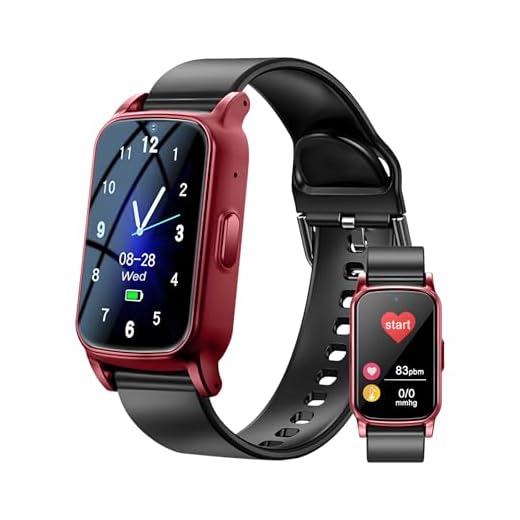
Advanced systems include two-way voice communication, allowing responders to assess your situation remotely. You can also trigger manual alerts through voice commands, wearable buttons, or accessible switches, giving you control when automated detection isn’t sufficient for your specific emergency.
Fall Detection and Response
Falls represent one of the most dangerous risks you’ll face with mobility impairments or age-related physical changes, making fall detection technology a cornerstone of accessible home automation safety systems. Modern sensors deploy accelerometers and pressure-sensitive floor mats to identify fall patterns instantly.
| Detection Method | Response Time | Integration Capability |
|---|---|---|
| Wearable sensors | 2-5 seconds | Smart hubs, medical alerts |
| Floor pressure mats | Immediate | Lighting, door access |
| Camera-based AI | 3-8 seconds | Emergency services, family |
| Radar motion sensors | 1-3 seconds | Voice assistants, alarms |
| Smartwatch algorithms | 5-10 seconds | Mobile apps, contacts |
Your response strategies should include automatic emergency calls, door access for first responders, and activating pathway lighting. Configure multi-tier alerts: immediate caregiver notification, followed by emergency services if you don’t respond within predetermined timeframes.
Voice-Activated Emergency Protocols
As your physical abilities change, you’ll need emergency communication methods that work even when reaching for a phone becomes impossible.
Voice-activated emergency protocols give you direct control through simple voice commands, eliminating physical barriers between you and help.
Configure your system to recognize specific emergency phrases that trigger automated responses. When you say “call emergency services,” your system dials 911 while simultaneously opening doors for first responders.
Program custom voice commands to alert family members, caregivers, or monitoring services based on severity levels.
Your emergency notifications should activate multiple channels simultaneously—text messages, phone calls, and smart home alerts—ensuring someone responds quickly.
Set up location-based announcements that guide responders to your exact position within your home, providing critical information when seconds matter.
Cost Considerations and Funding Options for Accessibility Technology

Home automation accessibility technology ranges from $50 smart plugs to $15,000+ all-inclusive systems, making upfront cost planning essential for your project’s success. Strategic budget planning requires evaluating multiple funding sources simultaneously to optimize your purchasing power.
Available Funding Mechanisms
| Funding Source | Key Considerations |
|---|---|
| Insurance Coverage | Requires medical documentation; may cover assistive technology as durable medical equipment |
| Government Assistance | Medicare/Medicaid waiver programs; state vocational rehabilitation services provide equipment funding |
| Nonprofit Organizations | Disability-specific groups offer grants; technology discounts through partner programs |
| Alternative Funding | Crowdfunding options for gap financing; grant applications to foundations supporting accessibility initiatives |
You’ll strengthen grant applications by documenting how automation technology directly improves independence and reduces long-term care costs. Many manufacturers offer disability discounts—contact them directly. Veterans can access specialized funding through VA programs. Combine multiple funding sources to build extensive systems incrementally, prioritizing critical safety features first.
Frequently Asked Questions
Can Voice Control Systems Understand Speech Patterns Affected by Disabilities Like Cerebral Palsy?
Yes, modern systems can understand speech patterns affected by cerebral palsy through advanced speech recognition technology.
You’ll find disability adaptation features like voice training, custom pronunciation profiles, and AI learning algorithms that adjust to your unique patterns.
Leading platforms including Google Assistant and Apple’s Siri offer personalized voice models you can train.
You’ll achieve better accuracy by using dedicated accessibility-focused systems or augmentative communication devices with integrated smart home control.
Will My Insurance Cover Smart Home Automation Devices Prescribed for Accessibility Needs?
Insurance coverage for smart devices varies greatly by provider and plan type.
You’ll need to obtain a formal prescription from your physician documenting medical necessity. Medicare and some private insurers may cover devices under Durable Medical Equipment (DME) benefits, but you’ll likely face prior authorization requirements.
Contact your insurance company directly with specific product details and CPT codes. Many users successfully appeal initial denials with proper documentation demonstrating how these technologies improve independence and safety.
What Happens to Voice-Controlled Devices During Internet or Power Outages?
During power outages, most voice-controlled devices stop functioning entirely unless you’ve installed battery backup systems.
Internet outages create significant voice control limitations—cloud-dependent devices like Alexa and Google Home lose functionality, while locally-controlled systems maintain basic operations.
You’ll need to implement redundant power solutions (UPS systems, generators) and choose hub-based automation that stores commands locally.
For critical accessibility needs, always maintain manual override options and backup control methods to guarantee device functionality during outages.
Are Voice Assistants Hipaa-Compliant for Users With Medical Privacy Concerns?
Your health data shouldn’t be an open book. Standard voice assistants aren’t HIPAA-compliant—they’re designed for convenience, not medical-grade security.
If you’re managing privacy concerns around medical devices, you’ll need specialized healthcare platforms with Business Associate Agreements (BAAs).
Amazon Alexa offers HIPAA-eligible skills through their Healthcare program, but only for approved developers.
You’re better off compartmentalizing: use dedicated, compliant systems for medical data and keep general voice assistants separate from sensitive health information.
Can Multiple Caregivers Program Different Voice Profiles for One User’s System?
Yes, you can enable multiple caregivers to program distinct voice profiles while maintaining centralized user personalization for the primary user.
Most systems support household accounts where each caregiver accesses shared smart home controls through their unique voice profile.
You’ll configure admin permissions allowing caregiver collaboration without compromising the user’s customized settings.
This approach gives you granular control over who manages specific automation routines, ensuring smooth changes between care shifts while protecting personalized accessibility configurations.
Conclusion
You might worry that smart home technology is too complex to set up, but today’s voice-controlled systems are designed with accessibility in mind—they’re easier than you’d think. Start small with a single smart speaker and one or two compatible devices. You’ll quickly discover how voice automation changes your daily independence. Don’t let technology intimidation hold you back from solutions that’ll genuinely improve your quality of life. Your accessible smart home is within reach.
Make Your Home Smarter
Device reviews, automations, and the deals worth grabbing.
Related Articles You Might Like