- Key Takeaways
- Smart Plugs: The Universal Solution for Appliances Without Built-In Connectivity
- Retrofit Light Switches and Bulb Adapters That Work With Existing Fixtures
- Adding Intelligence to Door Locks, Garage Doors, and Entry Points
- Thermostat Overlays and HVAC Controllers for Climate Control
- Window Treatment Motors and Blind Conversion Kits
- Motor Types and Compatibility
- Installation Process and Tools
- Smart Home Integration Options
- Hub Devices and IR Blasters for Controlling Non-Connected Electronics
- How IR Blasters Work
- Popular Hub Device Options
- Setup and Compatibility Tips
- Frequently Asked Questions
- Will Retrofitting Devices Void My Home Insurance or Appliance Warranties?
- How Much Does It Cost Monthly to Maintain Smart Home Subscriptions?
- Can Retrofitted Devices Work During Internet or Power Outages?
- Do Smart Retrofits Increase My Home’s Resale Value Significantly?
- What Happens to My Devices When Manufacturers Discontinue Cloud Support?
- Conclusion
- Related Reading
- Related Reading



You can change existing appliances into smart devices using retrofit solutions that cost $10-80 per unit instead of replacing everything. Smart plugs add voice control to any outlet-powered device, while retrofit switches and bulb adapters modernize lighting without rewiring. Install smart locks over existing deadbolts, add thermostat overlays to enhance HVAC systems, and use IR blasters with hub devices to control older TVs and electronics through smartphone apps. These targeted upgrades deliver connectivity while preserving your functional equipment and budget, with strategic implementation releasing extensive home automation capabilities.
Key Takeaways
- Smart plugs ($10-30) convert ordinary appliances into connected devices controllable via smartphone or voice commands without replacing equipment.
- Retrofit smart locks install over existing deadbolts, maintaining exterior appearance while adding keyless entry and remote access capabilities.
- Thermostat overlay solutions intercept control signals to automate climate control, avoiding costly replacements while reducing energy consumption by 40-50%.
- Retrofit motor kits ($50-300+) automate existing blinds and shades, with installation taking 45-60 minutes per window using basic tools.
- IR blaster hubs ($30-60) enable smartphone control of older TVs and air conditioners by emitting infrared commands to legacy devices.
Smart Plugs: The Universal Solution for Appliances Without Built-In Connectivity

Smart plugs convert ordinary appliances into connected devices without requiring expensive replacements or complex installations. You’ll gain immediate control over lamps, fans, coffee makers, and space heaters through your smartphone or voice commands. The investment ranges from $10-30 per unit—substantially less than purchasing new smart appliances.
Smart plug benefits extend beyond remote operation. You’ll schedule devices to activate automatically, reducing energy waste from standby power consumption. Advanced models include energy monitoring capabilities, displaying real-time electricity usage and historical consumption patterns. This data enables you to identify power-hungry devices and enhance operation times during off-peak rates.
Installation requires zero technical expertise. You’ll simply plug the smart plug into your outlet, connect the appliance, then link it to your home network via a companion app.
Most units support 15-amp loads, accommodating standard household devices. Choose models compatible with your existing smart home ecosystem for smooth integration and centralized control. Many smart plugs work seamlessly with voice assistants like Alexa, allowing you to control your newly connected devices through simple voice commands.
Retrofit Light Switches and Bulb Adapters That Work With Existing Fixtures
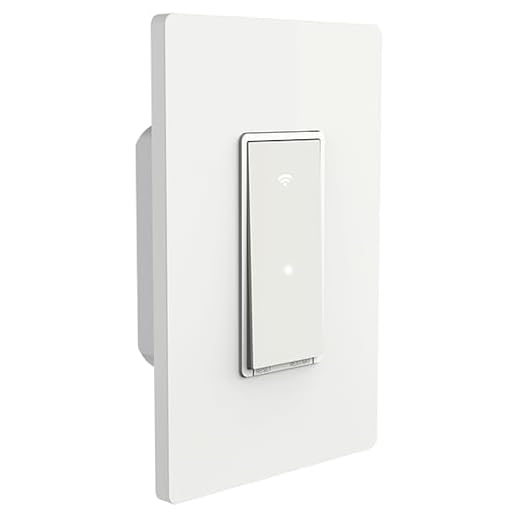
Unlike smart plugs that create an intermediary connection point, retrofit light switches replace your existing wall switches to provide control at the circuit level.
You’ll gain centralized command over entire lighting zones without replacing individual bulbs. These switches maintain smart bulb compatibility while allowing manual override—critical when network connectivity fails.
Retrofit switch options span three tiers: basic on/off models ($20-30), dimmer variants ($35-50), and advanced units with motion sensors ($50-80).
Installation requires neutral wire access in most cases, though newer models accommodate older two-wire configurations. You’re fundamentally upgrading infrastructure rather than endpoints.
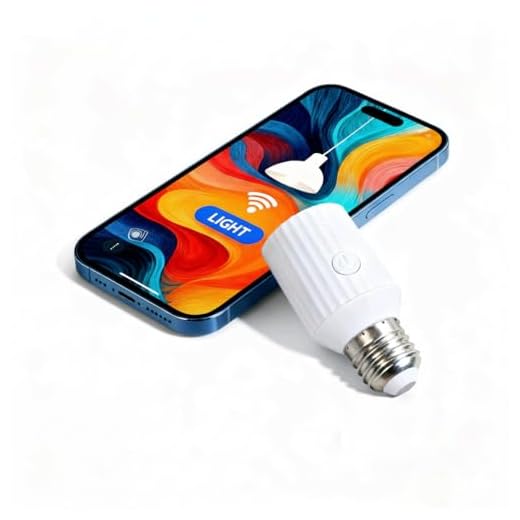
Consider bulb socket adapters as complementary solutions. These screw-in devices convert standard fixtures into smart-capable units for $15-25 each.
They’re ideal for difficult-to-wire locations like rentals or historic properties where wall modifications aren’t feasible.
Match your retrofit strategy to usage patterns: high-traffic areas warrant switch replacements, while occasional-use fixtures benefit from adapter solutions.
For iPhone users, the Home app provides centralized control over compatible retrofit switches and bulb adapters alongside other smart home accessories.
Adding Intelligence to Door Locks, Garage Doors, and Entry Points

Entry point security represents your home’s most critical automation opportunity, where physical access control intersects with remote monitoring capabilities.
You’ll find retrofit smart locks install over existing deadbolts without replacing the entire mechanism—preserving your current keys while adding keyless entry through codes, smartphones, or biometrics.
Models like August and Wyze attach to your interior deadbolt thumb-turn, maintaining exterior aesthetics while delivering remote locking capabilities and access logs.
For garage doors, retrofit controllers like Chamberlain MyQ integrate with existing openers, providing smartphone control and real-time status monitoring for $30-50.
You’ll eliminate the “Did I close the garage?” uncertainty.
Window and door sensors complete your perimeter intelligence, alerting you to unexpected openings.
These battery-powered units mount adhesively without wiring modifications.
Smart lock features include temporary access codes for service providers, auto-locking timers, and integration with video doorbells for thorough entry monitoring.
You’re creating layered security without reconstruction costs.
Thermostat Overlays and HVAC Controllers for Climate Control
Climate control consumes 40-50% of your home’s energy budget, making thermostat automation the highest-ROI smart retrofit you’ll implement.
Modern overlay solutions bypass thermostat compatibility issues by intercepting control signals between your existing unit and HVAC system, eliminating costly replacements.
Climate control automation capabilities you’ll gain:
- Geofencing triggers that adjust temperature based on proximity, preventing energy waste when you’re away
- Zone-based scheduling through multiple sensor deployment, optimizing comfort per room rather than single-point measurement
- Demand response integration that reduces consumption during peak-rate hours, cutting utility costs by 20-30%
- Predictive algorithms that learn thermal patterns and pre-condition spaces before occupancy
- Remote diagnostics alerting you to HVAC inefficiencies or failures before they escalate
Install controllers like Sensibo Sky for mini-splits or Cielo Breez for window units.
For central systems, retrofit with Ecobee SmartThermostat or integrate existing thermostats using Zigbee relay modules.
You’ll achieve enterprise-level climate management without infrastructure overhaul.
Window Treatment Motors and Blind Conversion Kits

You can automate existing window treatments without full replacements by installing retrofit motor kits that attach to your current blinds, shades, or curtains.
These motors range from $50 battery-powered units for simple roller shades to $300+ hardwired systems for heavy drapes, with compatibility depending on your treatment’s weight, mounting style, and control mechanism.
Integration with your smart home ecosystem requires matching the motor’s protocol—Wi-Fi, Zigbee, or Z-Wave—to your hub, while installation typically needs basic tools like a drill, screwdriver, and level.
Motor Types and Compatibility
When selecting a motor for your window treatment retrofit, you’ll encounter three primary types: AC-powered, battery-operated, and solar-rechargeable units. Each addresses specific compatibility issues with your existing infrastructure.
Critical considerations for motor selection:
- AC-powered motors deliver consistent torque for heavy drapes but require nearby outlets or professional wiring modifications.
- Battery-operated units offer installation flexibility without electrical work, though you’ll face ongoing replacement costs ($30-60 annually).
- Solar-rechargeable models eliminate battery maintenance while demanding adequate sunlight exposure for reliable operation.
- Torque ratings must match your blind weight—undersized motors fail prematurely, while oversized units waste money.
- Smart protocol compatibility (Zigbee, Z-Wave, Wi-Fi) determines integration capabilities with your existing automation ecosystem.
Measure roller diameter and fabric weight before purchasing to verify proper motor specification.
Installation Process and Tools
Most motor retrofits complete within 45-60 minutes per window once you’ve gathered the right equipment.
You’ll need a power drill with appropriate bits, measuring tape, level, and screwdrivers matching your hardware specifications.
The DIY process starts with removing existing mounting brackets and measuring motor placement precisely—misalignment causes friction and premature failure.
Installation tools like stud finders guarantee secure mounting in load-bearing areas, critical for heavier treatments.
Mount the motor according to manufacturer specs, then attach your blind mechanism to the drive shaft.
Test rotation direction before final assembly; reversing polarity now saves reinstallation time.
Wire management clips maintain clean aesthetics while preventing cord interference.
Program your control system last, verifying full extension and retraction cycles.
This methodical approach eliminates costly service calls.
Smart Home Integration Options
While compatibility varies across manufacturers, three primary protocols dominate smart blind integration: Wi-Fi, Zigbee, and Z-Wave. Your selection determines which smart home ecosystems you’ll access and affects long-term operational costs.
Protocol Selection Criteria:
- Wi-Fi models connect directly to your router, enabling immediate voice assistant integration with Alexa, Google Assistant, and Siri without additional hubs.
- Zigbee systems require a compatible hub but consume minimal power and create mesh networks for extended range.
- Z-Wave devices operate on dedicated frequencies, eliminating Wi-Fi congestion while demanding hub investment ($50-150).
- Thread-enabled motors future-proof your installation for Matter protocol adoption.
- Proprietary bridges from manufacturers like Lutron offer premium reliability at $80-200 per hub.
Consider your existing infrastructure before committing capital to new ecosystem components.
Hub Devices and IR Blasters for Controlling Non-Connected Electronics

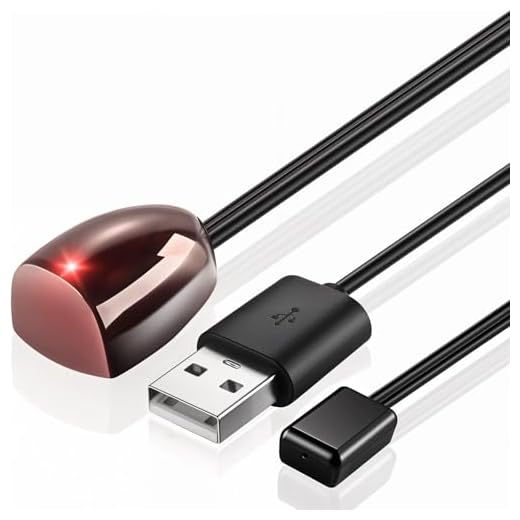
You can extend smart home control to older electronics like TVs, cable boxes, and air conditioners using hub devices with built-in IR (infrared) blasters—technology that mimics your traditional remote controls.
These hubs, available from brands like Broadlink ($30-50), Logitech Harmony (discontinued but still functional), and SwitchBot ($40-60), convert Wi-Fi commands into infrared signals your legacy devices understand.
Setup requires line-of-sight positioning, device compatibility verification, and proper code library configuration to guarantee reliable command execution.
How IR Blasters Work
An IR blaster bridges the gap between your modern smart home system and older electronics that only respond to infrared remote controls. This device replicates the same IR technology your traditional remote control uses, sending coded light pulses that your equipment recognizes as commands.
How the technology delivers control:
- Signal transmission: The blaster emits infrared light beams at 940nm wavelength, invisible to human eyes but detectable by device sensors.
- Command database: Pre-programmed codes for thousands of manufacturers let you control TVs, stereos, and cable boxes instantly.
- Smart hub integration: Connects via Wi-Fi or USB to receive commands from your automation system.
- Multi-device targeting: Directional emitters or stick-on pods position signals precisely where needed.
- Cost efficiency: $20-80 investment eliminates expensive equipment replacements.
You’ll gain complete automation without touching existing hardware.
Popular Hub Device Options
Several market-leading hubs have built their reputations on reliable IR blaster integration and extensive device compatibility.
The Logitech Harmony Elite delivers thorough hub device features, controlling over 270,000 entertainment and smart home devices through its IR database. You’ll gain unified control over legacy equipment and modern IoT products simultaneously.
Hub device compatibility extends further with the BroadLink RM4 Pro, offering IR and RF transmission at budget-conscious pricing—ideal for managing air conditioners, TVs, and audio receivers.
For HomeKit users, the MOES Smart IR Remote provides native Apple integration without subscription fees. Each option supports voice commands through Alexa, Google Assistant, or Siri, converting isolated devices into cohesive systems.
Your selection depends on existing ecosystem investments and the specific legacy equipment you’re targeting.
Setup and Compatibility Tips
Before purchasing any IR blaster hub, verify that your target devices actually use infrared protocols by checking for a glossy receiver window on the front panel—typically found on TVs, cable boxes, and older audio equipment manufactured before 2015.
Critical compatibility considerations:

- Line-of-sight requirements: Position IR blasters within 15 feet with unobstructed paths to receiver windows
- Database limitations: Verify your device manufacturer appears in the hub’s supported equipment list before purchasing
- Multi-device conflicts: Program unique IR codes to prevent cross-control between similar devices
- Setup challenges: Allocate 2-3 hours for initial configuration and command testing per room
- Firmware dependencies: Download manufacturer updates before integration to resolve compatibility issues
Test each programmed command three times minimum. Document working configurations immediately—you’ll need this reference when troubleshooting inevitable conflicts or expanding your system later.
Frequently Asked Questions
Will Retrofitting Devices Void My Home Insurance or Appliance Warranties?
Retrofitting can trigger insurance implications and warranty limitations if you’re not strategic.
You’ll void most appliance warranties by modifying internal wiring or components. However, external smart plugs and non-invasive sensors won’t affect coverage.
Before installing, you should document your home’s original state, notify your insurer about smart device additions, and choose UL-certified retrofit solutions. This protects your investment while maintaining coverage.
Always review your policy’s electrical modification clauses—knowledge here gives you negotiating power.
How Much Does It Cost Monthly to Maintain Smart Home Subscriptions?
Your smart home’s financial backbone—subscription fees—typically runs $0-50 monthly depending on your ecosystem choices.
You’ll find platforms like SmartThings and Home Assistant offer free tiers, while premium security or cloud storage services demand $5-30 monthly.
Here’s your power move: strategically select devices with local control capabilities, eliminating recurring costs altogether.
This approach delivers genuine cost savings, putting you in command of your budget while maintaining full functionality—true autonomy without perpetual payments.
Can Retrofitted Devices Work During Internet or Power Outages?
During power outages, most retrofitted smart devices won’t function since they require electricity.
However, you can maintain device functionality with battery backups or UPS systems ($50-200).
Internet outages pose bigger challenges—cloud-dependent devices become unresponsive, but local protocol systems (Zigbee, Z-Wave) preserve basic controls.
You’ll retain more autonomy by choosing retrofit solutions with local processing capabilities and investing in backup power infrastructure, giving you resilient control when networks fail.
Do Smart Retrofits Increase My Home’s Resale Value Significantly?
Smart home technology retrofits typically add modest resale value—roughly 3-5% for strategic upgrades.
You’ll optimize returns by focusing on high-visibility features: smart thermostats, security systems, and lighting controls.
However, you shouldn’t expect dollar-for-dollar recoupment. The real value lies in faster sales and broader buyer appeal.
Target cost-effective, mainstream solutions rather than niche systems.
Document your installations professionally, emphasize energy savings, and guarantee all devices function smoothly during showings to command premium pricing.
What Happens to My Devices When Manufacturers Discontinue Cloud Support?
Your devices typically lose remote access and automation features, though basic functions often remain.
When Wink’s 2020 subscription pivot left thousands stranded, users lost app control overnight—highlighting critical cloud support implications.
You’ll face device functionality concerns like disabled voice commands and scheduling.
Protect yourself by choosing local-control options (Zigbee, Z-Wave) or open-source platforms like Home Assistant.
You’ll maintain independence from corporate decisions while preserving your investment’s core capabilities.
Conclusion
You don’t need to rip out perfectly functional equipment to join the smart home revolution. With retrofit devices ranging from $15 smart plugs to $200 conversion kits, you’ll change your existing infrastructure without the waste or expense of full replacements. Calculate your priorities—start with high-impact areas like lighting and climate control, then expand systematically. Your home’s intelligence grows incrementally, preserving your budget while delivering the automation, monitoring, and remote control you’re after. The upgrade path is modular, not prohibitive.
🔌 Editor’s Pick
Editor’s Pick: a smart home hub with broad compatibility, smart thermostat, plug, light bulbs, and doorbell.
Make Your Home Smarter
Device reviews, automations, and the deals worth grabbing.
Related Articles You Might Like