- Key Takeaways
- What to Look for When Choosing Smart Plugs and Switches
- Best Overall Smart Plug for Whole-Home Integration
- Multi-Platform Compatibility Features
- Energy Monitoring Capabilities
- Setup and Installation Process
- Top Budget-Friendly Smart Plug for Beginners
- Easy Setup Process
- Essential Features Included
- Best Value Options
- Best Smart Switch for Kitchen Appliances
- Best Outdoor Smart Plug for Patios and Gardens
- Best Energy-Monitoring Smart Plug for Home Offices
- Real-Time Power Usage Tracking
- Cost Savings and Reports
- Compatible Home Office Devices
- Best Compact Smart Plug for Tight Spaces
- Best Smart Light Switch for Bedrooms
- Best Multi-Outlet Smart Power Strip for Entertainment Centers
- How to Set Up and Automate Your Smart Plugs and Switches
- Frequently Asked Questions
- Can Smart Plugs Work During Internet Outages or Power Failures?
- Do Smart Plugs Increase Electricity Bills When Devices Are Plugged In?
- Are Smart Plugs Compatible With Aluminum Wiring in Older Homes?
- Can I Control Smart Plugs When I’m Traveling Internationally?
- Do Smart Switches Require a Neutral Wire for Installation?
- Conclusion
- Related Reading
- Related Reading


You’ll want smart plugs that match your room’s specific needs: compact models like the Kasa EP10 for tight spaces, weather-resistant IP64-rated plugs for outdoor areas, and multi-outlet power strips with surge protection for entertainment centers. Look for Matter protocol support to guarantee future compatibility, energy monitoring to track consumption patterns, and 2.4GHz Wi-Fi connectivity for reliable performance. The best options balance load capacity with your devices’ wattage requirements while offering voice control through Alexa, Google Assistant, or HomeKit—and there’s much more to take into account for ideal automation.
Key Takeaways
- Kasa Smart Plug Mini (EP10) offers best overall value at $10 with energy monitoring, compact design, and multi-platform compatibility.
- Kitchen appliances require 15-amp rated switches like TP-Link Kasa KP125M with flame-retardant casing and scheduling features.
- Outdoor spaces need weather-resistant plugs with IP64 rating, UV-stabilized housing, and independent outlet control for gardens.
- Home offices benefit from energy-monitoring plugs providing real-time wattage data and alerts for power-hungry devices.
- Entertainment centers require multi-outlet power strips with individual control, surge protection, and USB charging ports.
What to Look for When Choosing Smart Plugs and Switches

When shopping for smart plugs and switches, you’ll need to evaluate several critical factors that directly impact functionality and long-term usability.
Compatibility is paramount. Verify the device works with your existing ecosystem—whether that’s Alexa, Google Home, or Apple HomeKit. Check voltage requirements and confirm your home’s wiring supports smart switches.
Smart home features determine what you can actually control. Look for scheduling capabilities, energy monitoring, voice commands, and automation triggers. Advanced models offer geofencing and away modes that enhance efficiency.
The user interface matters more than you’d think. A clunky app undermines the entire experience. Test whether the manufacturer provides intuitive controls, responsive performance, and regular firmware updates.

Physical design affects installation. Consider whether you need a hub, Wi-Fi strength in the installation location, and whether switches require a neutral wire. Compact plugs won’t block adjacent outlets.
Load capacity must match your devices—underpowered units create fire hazards.
Consider devices that support the Matter standard for improved interoperability across different smart home platforms and ecosystems.
Best Overall Smart Plug for Whole-Home Integration
When you’re building a thorough smart home ecosystem, you need a plug that works effortlessly across Alexa, Google Assistant, and HomeKit without forcing you into a single platform.
The best whole-home integration candidates offer real-time energy monitoring so you can track consumption patterns and identify power-hungry devices dragging down your efficiency.
Your setup experience matters too—look for plugs that connect directly to your 2.4GHz Wi-Fi network without requiring additional hubs or complicated pairing sequences.
For Apple users, the Home app provides centralized control of all smart home accessories with secure, encrypted communication that keeps your data private and accessible only to designated people.
Multi-Platform Compatibility Features
Your smart home ecosystem demands plugs that communicate in the same language as your existing devices, whether you’ve invested in Alexa, Google Assistant, Apple HomeKit, or Samsung SmartThings.
Premium smart plugs now offer smooth cross-platform integration, eliminating the frustration of incompatible hardware and fragmented control systems.
Voice assistant compatibility extends beyond basic on-off commands. You’ll access sophisticated scheduling, energy monitoring, and scene creation through natural language processing.
The best models support simultaneous connections to multiple platforms, letting you switch between ecosystems without reconfiguring devices.
Look for Matter protocol support—this emerging standard unifies smart home communication, future-proofing your investment.
Dual-band Wi-Fi connectivity guarantees reliable performance across 2.4GHz and 5GHz networks.
Native app functionality provides granular control when voice commands aren’t practical, giving you complete operational authority regardless of platform preference.
Energy Monitoring Capabilities
Real-time energy monitoring changes smart plugs from simple switches into powerful diagnostic tools that’ll expose exactly which devices drain your electricity budget.
Advanced models track voltage, amperage, and wattage with laboratory-grade precision, delivering granular usage statistics through dedicated dashboards. You’ll identify phantom loads from devices that consume power while idle—often accounting for 10% of residential energy costs.
Historical data reveals consumption patterns across hours, days, or months, enabling targeted interventions. The most sophisticated systems calculate cost projections based on your utility rates and set automated alerts when devices exceed predetermined thresholds.
Energy efficiency becomes measurable and actionable rather than abstract. Premium plugs integrate this data with home automation platforms, triggering scenes that shut down wasteful devices automatically, changing monitoring into tangible savings without requiring constant oversight.
Setup and Installation Process
While sophisticated monitoring features reveal energy consumption patterns, their value diminishes if the installation process creates technical barriers that prevent you from deploying plugs throughout your home.
You’ll find that premium models simplify setup through QR code scanning and automatic network detection, eliminating manual SSID entry and password configuration. The most deployment-friendly units support both 2.4GHz and 5GHz networks, though you’ll achieve ideal reliability on dedicated 2.4GHz connections.
When troubleshooting issues, verify your router’s broadcast settings and disable AP isolation—these account for 80% of connectivity failures. Advanced installation tips include reserving static IP addresses for mission-critical plugs and positioning devices within 30 feet of your router’s core coverage zone.
Master these fundamentals to establish strong whole-home automation infrastructure.
Top Budget-Friendly Smart Plug for Beginners
You don’t need to spend $30+ on a smart plug when several reliable options under $15 deliver the core features you’ll actually use daily.
The best budget picks offer straightforward app setup in under five minutes, voice control compatibility with Alexa or Google Assistant, and scheduling capabilities—without the premium price tag of advanced energy monitoring or Matter support.
Look for models from established brands like Kasa or Wyze that prioritize stability and user-friendly interfaces over excessive features you won’t utilize as a beginner.
Easy Setup Process
Setting up your first smart plug shouldn’t require an engineering degree or an afternoon of troubleshooting. Budget-friendly options deliver user friendly interfaces that eliminate complexity and get you operational in minutes.
You’ll download the companion app, plug in the device, and follow straightforward prompts to connect it to your Wi-Fi network.
Quick installation processes typically take under five minutes from unboxing to full functionality. The best budget models feature visual LED indicators that confirm each setup stage, preventing guesswork during configuration.
You’ll gain immediate control through voice commands or smartphone taps, scheduling power cycles and monitoring energy consumption without technical barriers.
Look for plugs offering detailed guided setup and automatic firmware updates—features that guarantee you’re maximizing control without investing excessive time in configuration protocols.
Essential Features Included
Budget smart plugs pack surprisingly strong functionality despite their affordable price tags. You’ll get reliable wireless connectivity through Wi-Fi networks without requiring additional hubs or complicated infrastructure.
The user interface delivers straightforward controls—typically through companion smartphone apps that let you power devices on or off remotely, set schedules, and monitor energy consumption.
Most budget models include voice control compatibility with Alexa and Google Assistant, giving you hands-free command over your connected devices. Timer functions enable automated power management, reducing energy waste and lowering utility bills.
Compact designs guarantee these plugs won’t block adjacent outlets, maximizing your available power sources. Away mode features randomize lighting patterns to simulate occupancy, deterring potential intruders.
These essential features alter basic outlets into intelligent power management systems that improve your control over your home environment.
Best Value Options
The Kasa Smart Plug Mini (EP10) stands as the definitive entry point for smart home newcomers, delivering strong performance at roughly $10 per unit.
You’ll get complete voice control through Alexa and Google Assistant, plus scheduling capabilities that rival premium alternatives. The compact design won’t block adjacent outlets—a critical advantage over bulkier affordable options.
Setup takes under three minutes via the Kasa app, and you’ll access energy monitoring to track consumption patterns.
The EP10 integrates smoothly with existing smart home ecosystems without requiring additional hubs or subscriptions. You’re getting 15-amp capacity, sufficient for most household devices including space heaters and window AC units.
For multi-room deployment, the four-pack drops per-unit costs below $8, letting you establish thorough control without significant investment.
Best Smart Switch for Kitchen Appliances
Kitchen appliances demand smart switches that can handle higher wattage loads and withstand humid, temperature-fluctuating environments.
You’ll need devices rated for 15-20 amps to safely control coffee makers, toasters, and stand mixers without overheating or tripping breakers.
The TP-Link Kasa KP125M stands out for kitchen appliance automation with its sturdy 15-amp rating and energy monitoring capabilities.
The TP-Link Kasa KP125M combines robust 15-amp capacity with real-time energy tracking, making it ideal for demanding kitchen appliances.
You’ll track exactly how much power your appliances consume, identifying energy hogs in real-time. Its compact design won’t block adjacent outlets, and the flame-retardant casing provides essential safety protection.
For smart kitchen integration, you can schedule your coffee maker to brew before you wake up or set your slow cooker to start while you’re still at work.
The Kasa app delivers detailed usage reports, helping you enhance energy consumption across all connected devices.
Choose switches with UL certification and thermal protection features—these aren’t optional for high-wattage kitchen applications where safety margins matter most.
Best Outdoor Smart Plug for Patios and Gardens

Outdoor smart plugs face brutal conditions—rain, snow, UV exposure, and temperature swings from below freezing to 100°F+—that’ll destroy standard indoor models within months.
You need plugs engineered specifically for weather resistance with IP64 or higher ratings, UV-stabilized housings, and sealed outlets that prevent water intrusion.
Look for models with metal-reinforced grounding prongs that won’t corrode and tamper-resistant outlet covers that lock when not in use.
The best outdoor plugs offer independent outlet control, letting you manage fountain pumps separately from string lights without killing power to everything.
Garden automation converts routine tasks into scheduled operations.
Program irrigation systems to run during prime morning hours, cycle grow lights for 14-hour photoperiods, or activate pest deterrent devices at dusk.
Smart scheduling eliminates the daily trek outside while enhancing water usage and energy consumption.
Choose plugs with local control capabilities—cloud outages shouldn’t disable your irrigation system during critical growing periods.
Best Energy-Monitoring Smart Plug for Home Offices
You’ll want an energy-monitoring smart plug that provides real-time wattage data and historical usage reports for your home office equipment.
These devices calculate your actual electricity costs per device, helping you identify power-hungry monitors, printers, and chargers that silently inflate your utility bills.
The best models integrate smoothly with computers, desk lamps, and multi-function printers while offering detailed breakdowns through their companion apps.
Real-Time Power Usage Tracking
Energy vampires lurk in every home office, silently draining power even when your devices appear idle. Real-time tracking capabilities let you identify which equipment consumes excessive standby power, allowing data-driven decisions about your energy usage.
You’ll see instant wattage readouts on your smartphone, revealing exactly how much power your multi-monitor setup, charging stations, and peripherals actually consume throughout the day.
Advanced energy-monitoring plugs deliver granular power consumption analytics, including voltage, amperage, and cumulative kilowatt-hour metrics. You can set custom thresholds and receive alerts when devices exceed predetermined limits.
This intelligence enables you to eliminate wasteful habits, schedule high-consumption equipment during off-peak hours, and quantify savings from efficiency improvements. The result? Complete operational visibility and control over your workspace’s electrical footprint, translating to reduced utility costs and enhanced performance.
Cost Savings and Reports
Smart plugs with extensive reporting capabilities convert raw energy data into actionable financial insights that directly impact your bottom line.
You’ll access detailed breakdowns showing exactly how much each device costs to operate daily, weekly, and monthly. These reports identify energy-draining culprits you didn’t know existed—that ancient laser printer consuming $47 annually on standby or your desktop monitor adding $23 monthly to your electric bill.
Advanced models generate cost efficiency analyses by comparing historical data against current usage patterns.
You’ll receive alerts when devices exceed predetermined spending thresholds, enabling immediate corrective action. The best systems integrate utility rate schedules, calculating precise costs based on time-of-use pricing.
This granular visibility alters vague concerns about energy savings into concrete dollar amounts, enabling you to make data-driven decisions that enhance your home office’s operational expenses.
Compatible Home Office Devices
Knowing your costs matters little if you can’t effectively monitor the devices driving those expenses. Energy-monitoring smart plugs excel at tracking your home office gadgets—from desktop computers and monitors to laser printers and charging stations.
You’ll identify which devices consume power during standby mode and which legitimately require constant operation.

Target high-wattage equipment first: workstations, multi-monitor setups, and external hard drive arrays. These productivity improvements often draw substantial phantom power when idle.
Smart plugs with real-time tracking let you establish automated schedules that align with your actual work hours, eliminating waste during nights and weekends.
Advanced models provide granular consumption data per device, enabling you to calculate operational costs down to the penny.
This intelligence modifies how you manage your workspace’s energy profile while maintaining full operational readiness.
Best Compact Smart Plug for Tight Spaces
Outlets near furniture, appliances, or in cramped spaces present a common frustration: standard smart plugs block adjacent sockets or simply won’t fit.
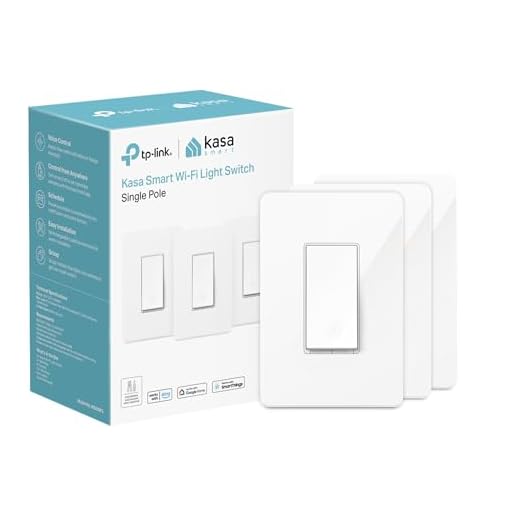
You need compact design solutions that enhance functionality without monopolizing your outlet real estate.
The Kasa Mini Smart Plug (EP10) delivers space saving solutions with its 2.36-inch width—50% smaller than conventional models.
At just 2.36 inches wide, the Kasa Mini EP10 cuts standard smart plug size in half while maintaining full functionality.
You’ll maintain access to both outlets while controlling lamps, fans, or chargers through voice commands or scheduling.
It supports 15A loads and integrates smoothly with Alexa, Google Assistant, and Apple HomeKit.
Consider the TP-Link Tapo P125M for ultra-tight installations.
Its side-facing design sits flush against walls, perfect for outlets behind entertainment centers or nightstands.
You’ll gain energy monitoring capabilities alongside remote control features.
These compact options don’t sacrifice performance for size.
You’re getting full smart home integration, app-based controls, and automated scheduling—all while preserving valuable outlet space for additional devices.
Best Smart Light Switch for Bedrooms

Bedroom lighting demands different control than other rooms—you need dimming without fumbling for switches in the dark, scheduling that aligns with your sleep routine, and ideally, voice control when you’re already under the covers.
The Lutron Caseta Wireless Dimmer delivers precise brightness control through its companion app, voice assistants, or the physical switch. You’ll program automated schedules that gradually dim lights as bedtime approaches, establishing consistent bedroom ambiance that supports your circadian rhythm.
The Pico remote option lets you control lights from your nightstand without reaching for your phone. Unlike basic on-off switches, this dimmer’s fade rate customization prevents jarring shifts when you wake at night.
It integrates smoothly with smart nightlights and other bedroom devices through HomeKit, Alexa, or Google Home. The neutral wire isn’t required for installation, making it compatible with most existing bedroom wiring.
You’re getting professional-grade lighting automation that changes your bedroom into a sleep-optimized environment you command with ease.
Best Multi-Outlet Smart Power Strip for Entertainment Centers
Entertainment centers create a unique power management challenge—multiple devices drawing standby power, tangled cords competing for outlets, and the constant risk of voltage surges damaging expensive equipment.
You need a multi-outlet smart power strip that delivers centralized control over your entire entertainment setup.
Look for models with individual outlet control, letting you kill phantom power drain on game consoles and streaming boxes while keeping your DVR recording.
Surge protection isn’t optional—it’s mandatory for safeguarding thousand-dollar TVs and sound systems.
USB charging ports eliminate wall wart clutter for controllers and remotes.
Energy monitoring reveals which components consume the most power, enabling data-driven efficiency decisions.
Scheduling features power down your entertainment setup automatically during unused hours.
The best strips integrate with voice assistants and automation routines, giving you command over your smart power ecosystem.
Voice control and smart home integration transform your entertainment center from a collection of devices into a unified, automated system.
Choose strips rated for high-wattage devices to handle amplifiers and subwoofers safely.
How to Set Up and Automate Your Smart Plugs and Switches

While smart plugs promise convenience, most users never progress beyond basic on/off control—leaving 90% of their automation potential untapped. You’ll reveal true value through strategic smart home automation workflows.
Start by linking devices to your ecosystem’s app—whether Alexa, Google Home, or HomeKit. Enable voice control integration immediately; you’ll use it more than expected.
Then create conditional automations: lights activate when you arrive home, heaters shut off when rooms reach target temperatures, fans trigger based on humidity sensors.
Schedule coffee makers for 6:47 AM, not 6:45—precision matters when optimizing morning routines. Group devices by function (bedroom nighttime protocol, entertainment mode, vacation security) rather than by room. This creates scalable command structures.
Advanced users should explore IFTTT integrations connecting weather data, location triggers, and cross-platform actions. Set notifications for power consumption spikes—they reveal malfunctioning appliances before catastrophic failure.
Your goal isn’t automation for novelty; it’s engineering a responsive environment that anticipates needs.
Frequently Asked Questions
Can Smart Plugs Work During Internet Outages or Power Failures?
Smart plugs functionality depends heavily on internet dependency. During internet outages, you’ll lose remote control and automation features, but your devices stay powered on in their last state.
However, during power failures, smart plugs won’t work at all—they need electricity to function. You can’t toggle them remotely or locally without power.
To maintain control during outages, you’ll want backup power solutions or consider hybrid smart switches with manual override capabilities for critical circuits.
Do Smart Plugs Increase Electricity Bills When Devices Are Plugged In?
Smart plugs won’t dramatically “enhance” your energy consumption—they typically draw 0.5-2 watts on standby.
You’ll see minimal impact unless you’re running high-wattage appliances constantly.
However, device compatibility matters: pairing smart plugs with energy-hungry equipment lets you monitor real-time usage and automate shutdowns, actually reducing bills.
The plug’s own consumption is negligible compared to what you’ll save through intelligent scheduling.
You’re gaining control over power waste, not adding to it.
Strategic automation pays dividends.
Are Smart Plugs Compatible With Aluminum Wiring in Older Homes?
Smart plugs themselves are compatible with aluminum wiring, but you’ll need to address underlying smart plug safety concerns first.
Aluminum wiring oxidizes and expands differently than copper, creating fire risks at connections. Before installing smart plugs, have a licensed electrician inspect your outlets and guarantee proper terminations using CO/ALR-rated devices.
You can’t compromise on this—aluminum wiring demands professional assessment. Once certified safe, you’ll gain full control over your smart home without electrical hazards.
Can I Control Smart Plugs When I’m Traveling Internationally?
Yes, you’ll maintain international control of your smart plugs through their cloud-based apps, provided you have internet access.
However, travel convenience depends on your setup—some features may lag due to distance from your home network.
You’ll want to verify your phone plan supports data abroad or connect via Wi-Fi.
Helpful hint: test remote access before departing to confirm firewall settings aren’t blocking connections. This gives you complete command over your devices.
Do Smart Switches Require a Neutral Wire for Installation?
Most smart switches do require a neutral wire for smart switch installation, though some models work without one.
You’ll find the neutral wire (typically white) bundled in your wall box. Check your wiring requirements before purchasing—older homes often lack neutral wires in switch boxes.
If you’re missing this essential connection, consider no-neutral smart switches or hire an electrician to run proper wiring.
Don’t compromise on correct installation for reliable smart home control.
Conclusion
You’ve seen how smart plugs convert mundane outlets into automation hubs, while basic switches remain stuck in the past. Whether you’re upgrading a single lamp or orchestrating whole-home control, you’ll find options for every budget and skill level. The initial setup takes minutes, but the convenience lasts years. Start small with one plug, or dive deep with integrated systems—either way, you’re investing in tangible efficiency. Your home’s intelligence begins with these simple, powerful devices.
🔌 Editor’s Pick
Editor’s Pick: Smart home hub with thermostat, smart plug, bulbs, and doorbell for whole-home control.
Make Your Home Smarter
Device reviews, automations, and the deals worth grabbing.
Related Articles You Might Like